
 EMOS
EMOS
Status & Fallbacks
All robots can fail, but smart robots recover.
EMOS components are Self-Aware and Self-Healing by design. The Health Status system allows every component to explicitly declare its operational state — not just “Alive” or “Dead,” but how it is functioning. When failures are detected, the Fallback system automatically triggers pre-configured recovery strategies, keeping the robot operational without human intervention.
Health Status
The Health Status is the heartbeat of an EMOS component. Unlike standard ROS2 nodes, EMOS components differentiate between a math error (Algorithm Failure), a hardware crash (Component Failure), or a missing input (System Failure).
These reports are broadcast back to the system to trigger:
Alerts: Notify the operator of specific issues.
Reflexes: Trigger Events to handle the situation.
Self-Healing: Execute automatic Fallbacks to recover the node.
Status Hierarchy
EMOS defines distinct failure levels to help you pinpoint the root cause of an issue.
HEALTHY “Everything is awesome.” The component executed its main loop successfully and produced valid output.
ALGORITHM_FAILURE “I ran, but I couldn’t solve it.” The node is healthy, but the logic failed. Examples: Path planner couldn’t find a path; Object detector found nothing; Optimization solver did not converge.
COMPONENT_FAILURE “I am broken.” An internal crash or hardware issue occurred within this specific node. Examples: Memory leak; Exception raised in a callback; Division by zero.
SYSTEM_FAILURE “I am fine, but my inputs are broken.” The failure is caused by an external dependency. Examples: Input topic is empty or stale; Network is down; Disk is full.
Reporting Status
Every BaseComponent has an internal self.health_status object. You interact with this object inside your _execution_step or callbacks to declare the current state.
The Happy Path
Always mark the component as healthy at the end of a successful execution. This resets any previous error counters.
self.health_status.set_healthy()
Declaring Failures
When things go wrong, be specific. This helps the Fallback system decide whether to Retry (Algorithm), Restart (Component), or Wait (System).
Algorithm Failure:
# Optional: List the specific algorithm that failed
self.health_status.set_fail_algorithm(algorithm_names=["A_Star_Planner"])
Component Failure:
# Report that this component crashed
self.health_status.set_fail_component()

# Or blame a sub-module
self.health_status.set_fail_component(component_names=["Camera_Driver_API"])
System Failure:
# Report missing data on specific topics
self.health_status.set_fail_system(topic_names=["/camera/rgb", "/odom"])
Automatic Broadcasting
You do not need to manually publish the status message.
EMOS automatically broadcasts the status at the start of every execution step. This ensures a consistent “Heartbeat” frequency, even if your algorithm blocks or hangs (up to the threading limits).
Tip
If you need to trigger an immediate alert from a deeply nested callback or a separate thread, you can force a publish:
self.health_status_publisher.publish(self.health_status())
Implementation Pattern
Here is the robust pattern for writing an execution step using Health Status. This pattern enables the Self-Healing capabilities of EMOS.
def _execution_step(self):
    try:
        # 1. Check Pre-conditions (System Level)
        if self.input_image is None:
            self.get_logger().warn("Waiting for video stream...")
            self.health_status.set_fail_system(topic_names=[self.input_image.name])
            return

        # 2. Run Logic
        result = self.ai_model.detect(self.input_image)

        # 3. Check Logic Output (Algorithm Level)
        if result is None or len(result.detections) == 0:
            self.health_status.set_fail_algorithm(algorithm_names=["yolo_detector"])
            return

        # 4. Success!
        self.publish_result(result)
        self.health_status.set_healthy()

    except ConnectionError:
        # 5. Handle Crashes (Component Level)
        # This will trigger the 'on_component_fail' fallback (e.g., Restart)
        self.get_logger().error("Camera hardware disconnected!")
        self.health_status.set_fail_component(component_names=["hardware_interface"])
Fallback Strategies
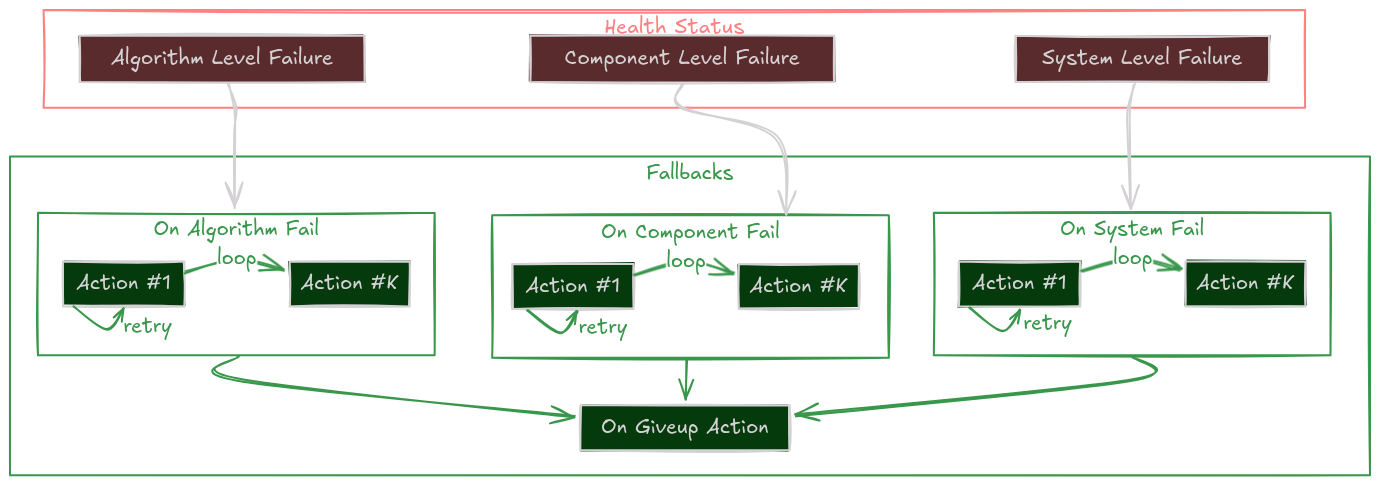
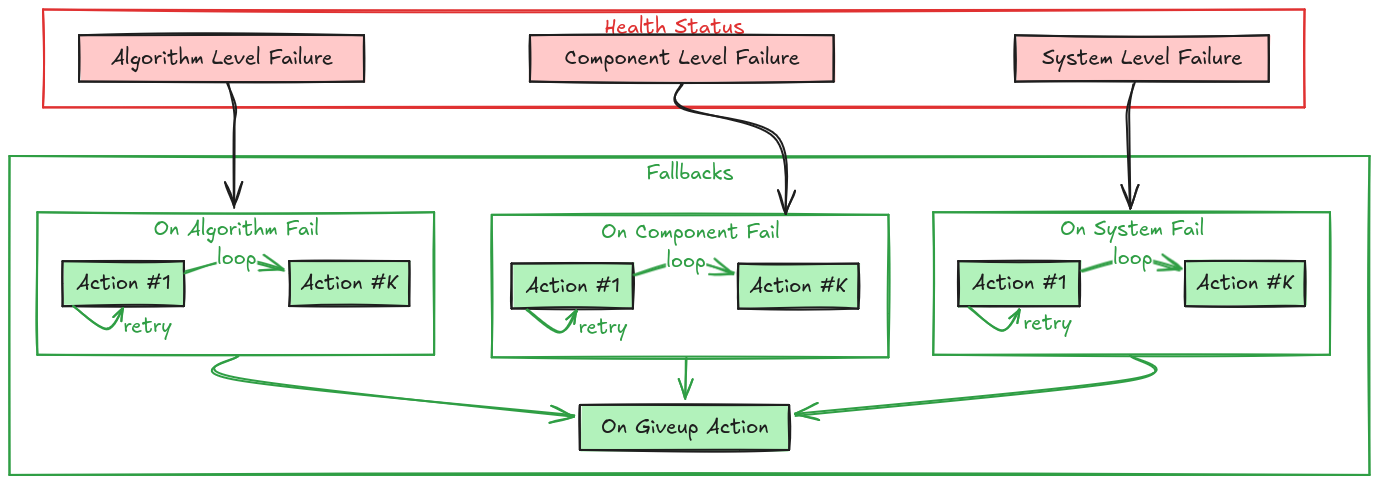
Fallbacks are the Self-Healing Mechanism of an EMOS component. They define the specific set of Actions to execute automatically when a failure is detected in the component’s Health Status.
Instead of crashing or freezing when an error occurs, a Component can be configured to attempt intelligent recovery strategies:
Algorithm stuck? \(\rightarrow\) Switch to a simpler backup.
Driver disconnected? \(\rightarrow\) Re-initialize the hardware.
Sensor timeout? \(\rightarrow\) Restart the node.
The Self-Healing Loop
The Recovery Hierarchy
When a component reports a failure, EMOS doesn’t just panic. It checks for a registered fallback strategy in a specific order of priority.
This allows you to define granular responses for different types of errors.
1. System Failure
on_system_failThe Context is Broken. External failures like missing input topics or disk full. Example Strategy: Wait for data, or restart the data pipeline.2. Component Failure
on_component_failThe Node is Broken. Internal crashes or hardware disconnects. Example Strategy: Restart the component lifecycle or re-initialize drivers.3. Algorithm Failure
on_algorithm_failThe Logic is Broken. The code ran but couldn’t solve the problem (e.g., path not found). Example Strategy: Reconfigure parameters (looser tolerance) or switch algorithms.4. Catch-All
on_failGeneric Safety Net. If no specific handler is found above, this fallback is executed. Example Strategy: Log an error or stop the robot.
Recovery Strategies
A Fallback isn’t just a single function call. It is a robust policy defined by Actions and Retries.
The Persistent Retry (Single Action)
Try, try again.
The system executes the action repeatedly until it returns True (success) or max_retries is reached.
# Try to restart the driver up to 3 times
driver.on_component_fail(fallback=restart(component=driver), max_retries=3)
The Escalation Ladder (List of Actions)
If at first you don’t succeed, try something stronger. You can define a sequence of actions. If the first one fails (after its retries), the system moves to the next one.
Clear Costmaps (Low cost, fast)
Reconfigure Planner (Medium cost)
Restart Planner Node (High cost, slow)
# Tiered Recovery for a Navigation Planner
planner.on_algorithm_fail(
    fallback=[
        Action(method=planner.clear_costmaps),      # Step 1
        Action(method=planner.switch_to_fallback),  # Step 2
        restart(component=planner)                  # Step 3
    ],
    max_retries=1 # Try each step once before escalating
)
The “Give Up” State
If all strategies fail (all retries of all actions exhausted), the component enters the Give Up state and executes the on_giveup action. This is the “End of Line”, usually used to park the robot safely or alert a human.
How to Implement Fallbacks
Method A: In Your Recipe (Recommended)
You can configure fallbacks externally without touching the component code. This makes your system modular and reusable.
from ros_sugar.actions import restart, log

# 1. Define component
lidar = BaseComponent(component_name='lidar_driver')

# 2. Attach Fallbacks
# If it crashes, restart it (Unlimited retries)
lidar.on_component_fail(fallback=restart(component=lidar))

# If data is missing (System), just log it and wait
lidar.on_system_fail(fallback=log(msg="Waiting for Lidar data..."))

# If all else fails, scream
lidar.on_giveup(fallback=log(msg="LIDAR IS DEAD. STOPPING ROBOT."))
Method B: In Component Class (Advanced)
For tightly coupled recovery logic (like re-handshaking a specific serial protocol), you can define custom fallback methods inside your class.
Tip
Use the @component_fallback decorator. It ensures the method is only called when the component is in a valid state to handle it.
from ros_sugar.core import BaseComponent, component_fallback
from ros_sugar.core import Action

class MyDriver(BaseComponent):
    def __init__(self, *args, **kwargs):
        super().__init__(*args, **kwargs)

        # Register the custom fallback internally
        self.on_system_fail(
            fallback=Action(self.try_reconnect),
            max_retries=3
        )

    def _execution_step(self):
        try:
            self.hw.read()
            self.health_status.set_healthy()
        except ConnectionError:
            # This trigger starts the fallback loop!
            self.health_status.set_fail_system()

    @component_fallback
    def try_reconnect(self) -> bool:
        """Custom recovery logic"""
        self.get_logger().info("Attempting handshake...")
        if self.hw.connect():
            return True # Recovery Succeeded!
        return False    # Recovery Failed, will retry...
Process-Level Recovery
The Health-Status / Fallback system above operates inside a running component. If a component goes further than that and the entire process crashes – a segfault in a native dependency, a Python os._exit, an OOM kill – there is nothing left running to dispatch a fallback. EMOS adds a layer underneath for exactly this case.
Respawning crashed processes – Launcher.on_process_fail
Launcher.on_process_fail() enables process-level respawning for every component the launcher started in multiprocessing mode. If a component process exits with a non-zero status outside of normal shutdown, the launcher relaunches it.
launcher = Launcher()
launcher.add_pkg(components=[...], multiprocessing=True, package_name="...")
launcher.on_process_fail(max_retries=3)   # respawn up to 3 times per component
launcher.bringup()
User-initiated shutdowns (Ctrl-C, SIGTERM) do not count as failures, so this won’t fight you when you stop the recipe yourself.
Tip
Pair on_process_fail with executor_spin_timeout (see Launcher) when running latency-sensitive callbacks – the latter prevents a slow callback from looking like a stalled process and tripping the respawn unnecessarily.