
 EMOS
EMOS
Web UI & API#
A recipe can serve an interface of its own. One call on the launcher, enable_ui, starts a UI node that introspects the recipe’s components, inputs, outputs, actions and routines and exposes them in two ways. A browser front end gives people forms, live feeds, settings panels and task cards without any front-end work. Underneath it, a JSON and WebSocket API gives other systems the same access, which is how a control center or a fleet manager takes the robot’s feeds and sends it commands without touching ROS.
This is the recipe’s interface, not the robot’s. The dashboard is where an operator installs, starts and stops recipes on the robot. What is described here is what a running recipe serves once it is up, and the dashboard links to it.
Enabling it#
from ros_sugar import Launcher
from ros_sugar.io import Topic

question = Topic(name="question", msg_type="String")
answer = Topic(name="answer", msg_type="String")
image = Topic(name="image_raw", msg_type="Image")

launcher = Launcher()
launcher.add_pkg(components=[vlm, router], package_name="agents", multiprocessing=True)
launcher.enable_ui(inputs=[question], outputs=[answer, image])
launcher.bringup()
inputs are the topics that can be published to from outside, outputs the ones that are served. When the recipe starts, the log prints the address, https://<robot-ip>:5001 by default.
Parameter |
Effect |
|---|---|
|
Topics to expose. Outputs the browser cannot render are still served by the API. |
|
The port, 5001 by default. |
|
Routines to expose as tasks, as objects or by name. |
|
Leaves the component settings panels out of the browser. |
|
|
|
|
|
How many messages per second a sampled stream sends by default, and the most a client may ask for. |
What the browser shows#
Settings. A panel per component with every configuration parameter, editable while the recipe runs.
Inputs and outputs. Text, numbers, booleans, points and poses as forms, a pose also picked on the map with its heading set by dragging; audio recorded from the microphone; live images and occupancy grids as cards, and everything else as a log of messages. EmbodiedAgents adds cards for its own types, such as detections and streamed text, and a package can register cards for types of its own.
Tasks. A card for each of the recipe’s action servers, and one for each routine passed to
enable_ui, with its steps checked off as they complete, a log of the steps it entered, and start, pause, resume and abort as its state allows.System graph. A draggable view of the running recipe: components as nodes, topics as typed edges, events and actions as elements of their own, each with a detail card. Visualizing the System Graph is a hands-on tour.
Any screen. The layout adapts from a desktop to a phone, and its assets are served from the robot, so it works with no internet.
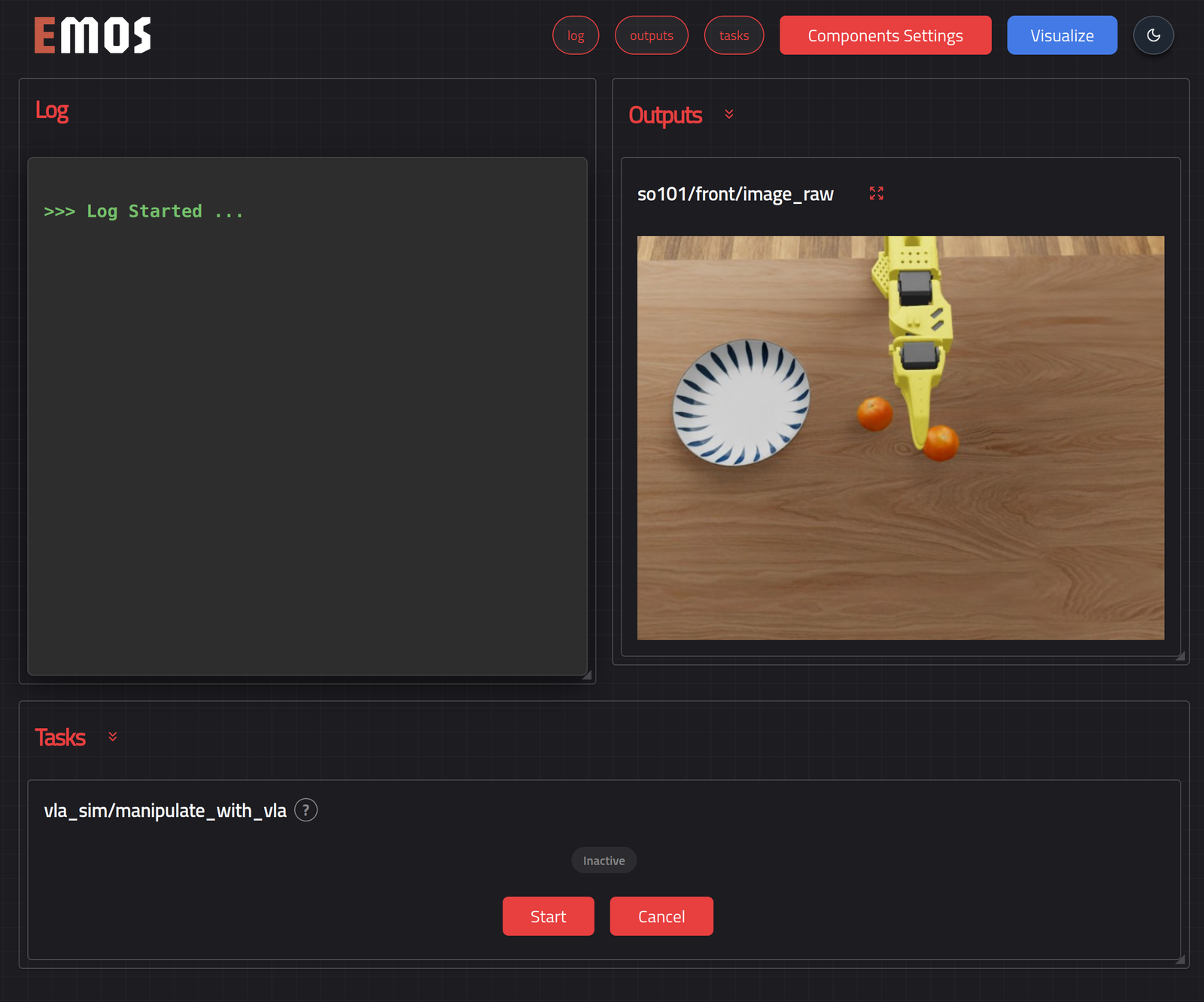
The interface of the VLA manipulation recipe: the log, the camera it declared as an output, and the task card of its action server.#
The API#
A robot rarely runs alone. A control center wants its camera feed and its position on the map. A fleet manager wants to know which task it is on and to hand it the next one. A factory system wants to ask it a question and get the answer back. Until now each of those meant bridging ROS, with its discovery, its middleware and its message definitions, into whatever the other side speaks, and doing it again for every robot and every integration.
The API is that bridge, built once and served by the recipe itself. It is one HTTPS endpoint on the robot that describes what the running recipe exposes, speaks plain JSON, and is guarded by a key. Any system that can make a web request reads the recipe’s feeds and sends it commands. Nothing on the other side needs ROS, and nothing in the recipe needs to know who is listening. The browser front end is one client of it; a control center is another, and they get exactly the same access.
Everything under /api is JSON over HTTPS, with WebSockets for anything that streams.
Authentication#
Every request except the health check carries an API key as a bearer token, on WebSocket handshakes too:
Authorization: Bearer sk_ui_...
Keys carry scopes. read covers discovery, the feeds and the routine states, and command covers everything that changes something: publishing to an input, calling a service, sending or cancelling a goal, and controlling a routine. A request without a valid key is answered 401, one whose key lacks the scope 403, and a WebSocket in either case is closed with code 1008. On an EMOS robot keys are managed with the CLI, and a key is shown once, when it is created:
emos config api-keys create --name control-center --scopes read,command
emos config api-keys list
emos config api-keys revoke <id>
A recipe with no valid keys refuses API calls and says so in its log. Commands sent by a page on another origin are refused, and the interface cannot be embedded in a frame elsewhere; read-only streams are open to any origin.
Discovery#
GET /api/interfaces describes the running recipe, so a client can be written against it rather than against a particular recipe. Each entry names the routes that serve it and the schema of its message, as field names and types:
{
  "inputs":   [{"name": "question", "msg_type": "String", "schema": {"data": "string"},
                "publish": "POST /api/inputs/question"}],
  "outputs":  [{"name": "image_raw", "msg_type": "Image", "schema": {...}, "mode": "sampled",
                "stream": "WS /api/outputs/image_raw", "latest": "GET /api/outputs/image_raw/latest"}],
  "services": [{"name": "...", "type": "...", "request_schema": {...}, "call": "POST /api/services/..."}],
  "actions":  [{"name": "...", "type": "...", "goal_schema": {...}, "send": "POST /api/actions/...",
                "feedback": "WS /api/actions/.../feedback", "cancel": "POST /api/actions/.../cancel"}],
  "routines": [{"name": "patrol", "state": "GET /api/routines/patrol", "stream": "WS /api/routines/patrol/state",
                "start": "POST /api/routines/patrol/start", "pause": "...", "resume": "...", "abort": "..."}],
  "worlds":   [{"name": "map", "grid": "map", "overlays": [{"name": "odom", "msg_type": "Odometry"}],
                "stream": "WS /api/world/map"}],
  "stream":   {"default_rate": 10.0, "max_rate": 30.0}
}
GET /api/health answers {"status": "ok"} and needs no key.
Feeds#
An output is followed on WS /api/outputs/{name}. Every message is a JSON object, {"topic": name, "payload": ...}, where the payload is the message’s content: its fields for most types, a frame for an image, a summary for heavy data such as a point cloud. Each output has a mode. A push output sends every message as it arrives, which suits text, states and detections. A sampled one sends the latest value at the default rate, which suits images and other high-rate data. A client overrides the mode per connection with a query parameter: ?rate=5 samples at five per second, clamped to the maximum, and ?rate=0 forces push.
import asyncio, json, websockets

async def follow(name, key):
    url = f"wss://robot.local:5001/api/outputs/{name}?rate=2"
    async with websockets.connect(url, additional_headers={"Authorization": f"Bearer {key}"}) as ws:
        async for message in ws:
            print(json.loads(message)["payload"])
GET /api/outputs/{name}/latest returns the most recent message in the same shape, or 404 when nothing has arrived yet.
A world composes a map with what moves on it. WS /api/world/{grid} streams the occupancy grid as {"op": "publish", "msg": ...} at the sampled rate, and between grids the recipe’s point, pose, odometry and path outputs as marker messages, so a map view can be drawn from one socket.
Commands#
Command |
Request |
Response |
|---|---|---|
Publish to an input: |
The message as a JSON object, in the schema discovery gives. |
|
Stream audio to an input: |
Frames as |
An acknowledgement, |
Call a service: |
The request as a JSON object. |
|
Send a goal: |
The goal as a JSON object. |
|
Cancel a goal: |
Empty. |
|
Follow a goal: |
|
curl -sk https://robot.local:5001/api/inputs/question \
  -H "Authorization: Bearer $KEY" -H "Content-Type: application/json" \
  -d '{"data": "What do you see?"}'
Routines#
The routines given to enable_ui are listed by GET /api/routines and read one at a time with GET /api/routines/{name}. POST /api/routines/{name}/start, /pause, /resume and /abort control one; an abort takes an optional {"reason": "..."}. A command the routine cannot take in its current state, such as pausing one that is not running, is refused with 409 and the reason. WS /api/routines/{name}/state pushes the routine’s state on connect and on every change, in the JSON described under Routines.
Errors#
Every error is a JSON object with a single error field:
Status |
Meaning |
|---|---|
|
The body is not a JSON object, or does not match the schema. |
|
No valid key, or a key without the needed scope. |
|
No such input, output, service, action or routine, or no data yet on an output. |
|
The command cannot be taken now: a goal is already running, or the routine is in the wrong state. |
|
Publishing, the service call, sending or cancelling a goal, or the routine command failed. |
|
The action server rejected the goal, or the service did not respond. |
|
The recipe is not ready to serve that yet. |
The certificate#
The interface is served over HTTPS. On a robot managed with emos, it uses the robot’s own certificate, the one the dashboard uses, so a client that trusts the dashboard trusts every recipe on that robot, and emos config tls-fingerprint prints the fingerprint to check against. Elsewhere, Sugarcoat mints a self-signed certificate on first use and renews it before it expires, and a browser shows its usual warning on first contact. secure=False turns all of this off, keys included, and serves plain HTTP, which is convenient on a development machine and nowhere else.
See also
Dashboard for the robot’s own web page, and its Security section for the certificate and pairing.
Routines for what the task cards and routine routes control.
Extending EMOS for adding browser cards for types of your own.