
 EMOS
EMOS
Components#
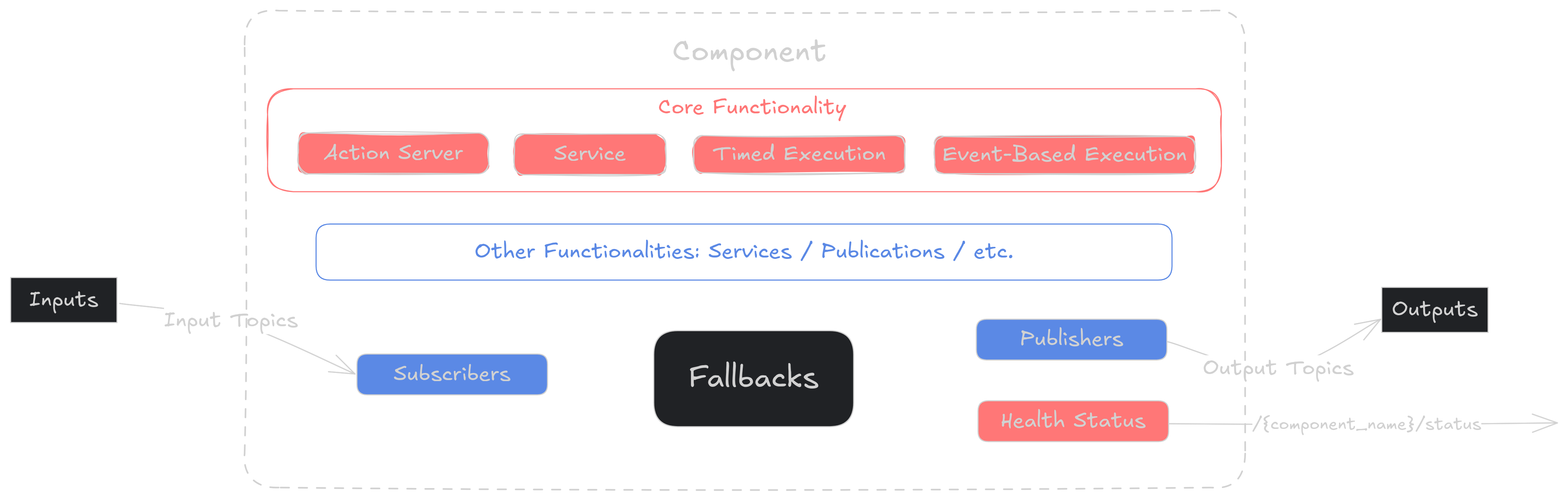
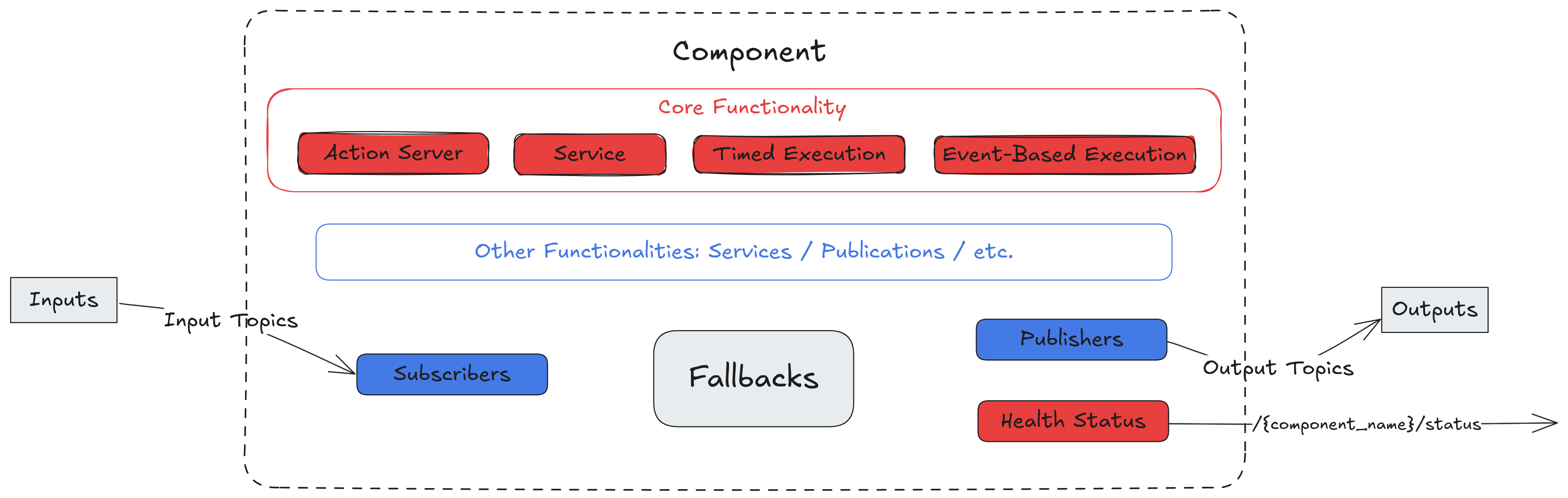
A component is the unit of execution in EMOS. It is a ROS 2 lifecycle node with the plumbing already done: declarative inputs and outputs, a typed configuration, a health status, fallbacks that run when that status turns bad, and actions that events, routines, the dashboard and Cortex can call. Every component in Kompass and EmbodiedAgents is built on the same base, and so is one you write yourself.
Component architecture#
What the base gives every component:
A managed lifecycle. Configure, activate, deactivate and shut down are real states with real transitions, which is what makes a recipe’s startup and shutdown deterministic and lets the launcher start, stop and restart a component on demand.
Declarative inputs and outputs. Declare a
Topicas an input or an output and the subscription, the publisher, the type conversion and the callback plumbing are created for you.Typed configuration. Settings live in an
attrsmodel that is validated when it is built, from Python or from a YAML, JSON or TOML file, so a wrong type fails before the robot moves.Health and self-healing. The component reports how it is doing, not just that it is alive, and runs the fallbacks it was given when something goes wrong.
Actions. Methods marked as actions are callable by name from events, routines, the recipe’s web interface and Cortex.
Creating a component#
from ros_sugar.core import BaseComponent
from ros_sugar.io import Topic

detector = BaseComponent(
    component_name="detector",
    inputs=[Topic(name="camera/rgb", msg_type="Image")],
    outputs=[Topic(name="detections", msg_type="Detections")],
)
Parameter |
What it is |
|---|---|
|
The node’s name. It is also how actions and events refer to the component. |
|
The topics the component subscribes to and publishes on. |
|
The component’s configuration, as an object or as the path of a file. |
|
The ROS action or service type of the component’s main server, for the two run types that have one. |
|
The component’s fallbacks, which can also be set afterwards with |
|
The ROS callback group. Reentrant by default. |
The components you use in recipes come from Kompass and EmbodiedAgents and take these same parameters plus their own. Extending EMOS covers writing one from the base.
Configuration#
A component’s settings live in a configuration object, an attrs class that is validated when it is built. Every component shares the base fields, and each kind adds its own on top:
Field |
Default |
What it sets |
|---|---|---|
|
100 Hz |
How often a timed component runs its main step. |
|
|
What drives the main step, see below. |
|
100 Hz |
How often the component checks its health and runs its fallbacks. |
|
0.01 s |
How long the component’s executor blocks per spin. Lower it for latency-sensitive callbacks. |
|
1 s |
With |
|
info, warn |
The component’s own log level, and the ROS client library’s underneath it. |
|
from the launcher |
The frame names and the robot description, set on every component by the launcher or the plugin. |
from kompass.components import Planner, PlannerConfig

planner = Planner(component_name="planner", config=PlannerConfig(loop_rate=10.0))
The same settings can come from a YAML, JSON or TOML file, given as config_file to the component or to the launcher for all of them, and can be changed while the recipe runs, from the dashboard’s settings panel or with the update_parameter actions. Configuration shows the file layouts.
Run types#
A component is not a while True loop by default. Its run type decides what drives its main work:
Run type |
What drives it |
Typical use |
|---|---|---|
|
A timer at |
Controllers, planners, drivers. |
|
A trigger topic or event. Dormant in between. |
Detectors, image processors. |
|
A ROS service request. Needs |
Calibration, on-demand computation. |
|
A ROS action goal. Needs |
Long-running work: navigation, manipulation. |
from ros_sugar.config import ComponentRunType

detector.run_type = ComponentRunType.EVENT   # or the string "Event"
controller.loop_rate = 50.0
An action-server component takes one goal at a time. A goal sent while another is running is rejected, and the running one is cleared by the cancel_main_goal action, which is also served as the /<component>/cancel_main_action service, so an event, a routine or the dashboard can interrupt it. The server’s name and the service’s name derive from the type, and main_action_name and main_srv_name override them.
Inputs and outputs#
Inside the component, inputs are read through self.callbacks, keyed by the topic’s name, and outputs are published through self.publishers_dict. Both convert between ROS messages and the Python objects the component works with, so an image arrives as an array and a pose leaves as a pose:
def _execution_step(self):
    if not self.got_all_inputs():
        return
    image = self.callbacks["camera/rgb"].get_output()
    result = self.model.detect(image)
    self.publishers_dict["detections"].publish(result)
got_all_inputs can be told which inputs matter, and get_missing_inputs names the ones that have not delivered yet. Topics declared with use_plugin are served by the robot’s plugin instead of a ROS subscription, and the component never sees the difference. Topics covers the declaration, and the launcher’s inputs and outputs helpers repoint a named topic on every component at once.
Frames#
A spatial input, a scan, a cloud, a grid, odometry, a path, poses or points, can be delivered already expressed in the frame the algorithm needs. Declare it in init_variables, before the subscribers exist:
def init_variables(self):
    self.transform_input_to("scan", self.config.frames.robot_base)
    self.transform_input_to("map", self.config.frames.world, static_tf=True)
The source frame is read from each message’s header, so no sensor frame is configured anywhere, and one TF buffer per component serves every pair. For a lookup of your own, get_transform(source, goal) returns the transform between two frames, or None until it is available. The frame names come from config.frames, which the launcher sets on every component from the recipe or from the robot plugin, so read them rather than hard-coding base_link.
Lifecycle hooks#
Keep the constructor light. A component is a plain object until it is launched, and the launcher inspects and configures it before it runs, so heavy resources such as cameras and models belong in the hooks, all of which are optional:
Hook |
Called |
|---|---|
|
At the start of activation, before the subscribers exist. |
|
After configuration. |
|
After activation. |
|
After deactivation. |
|
During cleanup. |
|
During shutdown. |
|
When a transition fails. |
The base resets the health status to healthy on configure, activate and deactivate, and marks a component failure on error, so the hooks rarely need to touch it.
Component actions#
A method marked with @component_action becomes callable by name from outside: by an event, as a step of a routine, from the recipe’s web interface, from the Monitor’s runtime API, and by Cortex as a tool. It returns the (success, message) pair every action does:
from ros_sugar.utils import ActionReturnType, component_action

class Navigator(BaseComponent):
    @component_action(active=True)
    def stop(self) -> ActionReturnType:
        self.publishers_dict["cmd_vel"].publish(Twist())
        return True, "stopped"
active=True restricts the action to the active state. A description in the decorator, in the OpenAI tool format, is what Cortex reads when it offers the method as a tool; without one, the docstring serves. Every component also inherits a set of actions that need no code:
Action |
What it does |
|---|---|
|
Lifecycle transitions. |
|
Applies a new configuration. |
|
Changes one or several parameters. |
|
Publishes the current health status. |
|
Clears the running goal of an action server. |
The same methods are what the ready-made actions in ros_sugar.actions call, so restart(component=navigator) in a recipe and navigator.restart() inside a routine are the same thing.
Health and fallbacks#
The component reports its state through self.health_status, distinguishing an algorithm that could not solve its problem from a component that is broken and from inputs that are missing, and runs the fallback that matches. Status and Fallbacks covers both.
Placing the process#
Under a multi-process launch every component has a process of its own, and launch_prefix prepends a command to it: CPU pinning, a scheduling class, a profiler.
vision.launch_prefix = "taskset -c 4-7"
logger.launch_prefix = "nice -n 10"
launcher.add_pkg(components=[vision, logger], package_name="my_pkg", multiprocessing=True)
The prefix has no effect on a component running as a thread of the launcher, and the launcher says so.
Good habits
Keep the constructor light. Open cameras and load models in
custom_on_configureorcustom_on_activate, so the component can be inspected and configured before it consumes anything.Report status every step. End a successful
_execution_stepwithself.health_status.set_healthy(). It is the heartbeat the rest of the system relies on.Catch, do not crash. Wrap the main logic in
try/except, report the failure at the right level, and let the fallbacks do their work while the process stays alive.
See also
Topics for declaring inputs and outputs, including plugin-served ones.
Events and Actions for calling component actions from events.
Status and Fallbacks for health reporting and recovery.
Extending EMOS for writing a component of your own.