
 EMOS
EMOS
Launcher#
A recipe is a Python script, and the Launcher is what turns that script into a running system. You hand it components, the robot’s plugin, the events you care about and what should happen when they fire. It configures and activates the components, wires plugin feeds to the components that asked for them, starts the drivers and external nodes the recipe needs, and keeps watch until the recipe ends. There is no launch file to write and nothing to build.
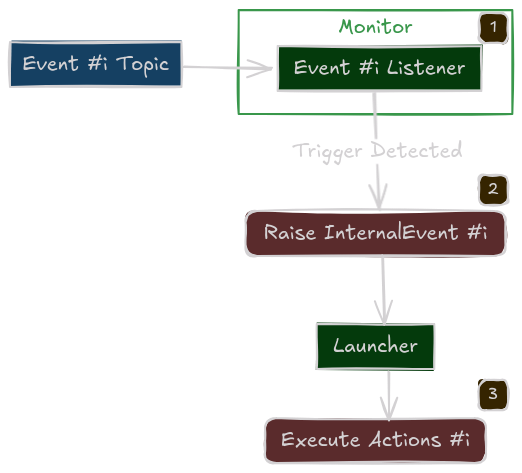
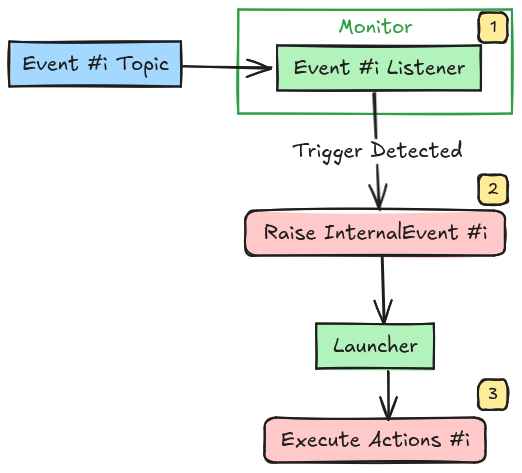
Every launcher also starts a Monitor node of its own. The Monitor is the part of a running recipe that evaluates events, runs actions and routines, and answers the dashboard and Cortex at run time. You never create it yourself, but it helps to know it is there.
from ros_sugar import Launcher

launcher = Launcher()
The constructor takes little: an optional ROS namespace for every node the recipe starts, a configuration file that applies to all components, and how long to wait for components to come up before activating them. Everything else is added with the methods below.
Components#
add_pkg adds components, one call per package they come from:
launcher.add_pkg(
    components=[planner, controller],
    package_name="kompass",
    multiprocessing=True,
)
Parameter |
What it does |
|---|---|
|
The components to run. |
|
The ROS package the components belong to and its executable entry point. Only needed with |
|
A mapping from events to the actions or routines they trigger. |
|
Whether this group of components runs as threads of the launcher process or as processes of their own. Off by default. |
|
Every component goes active at bringup unless you say otherwise. Name a subset to activate only those; the rest stay configured until an action starts them. |
|
The log level of the components, and of the ROS client library underneath them. |
How long each component’s executor blocks per spin is a component setting, executor_spin_timeout in its configuration, not a launcher one.
Threads or processes#
The choice is made per add_pkg call, so a recipe can mix both.
The default. All components run inside the launcher process, each with its own callback group, spun by one multi-threaded executor. Startup is fast, memory is shared and a debugger’s breakpoints work everywhere. The price is a single fault domain, and Python’s interpreter lock, which can hold back a recipe with many heavy components.
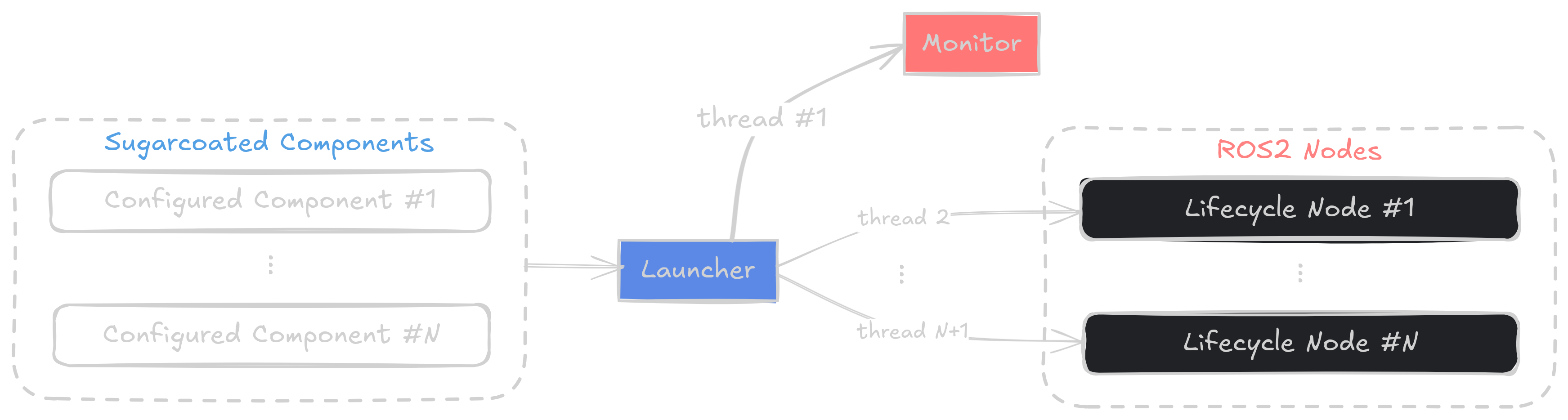
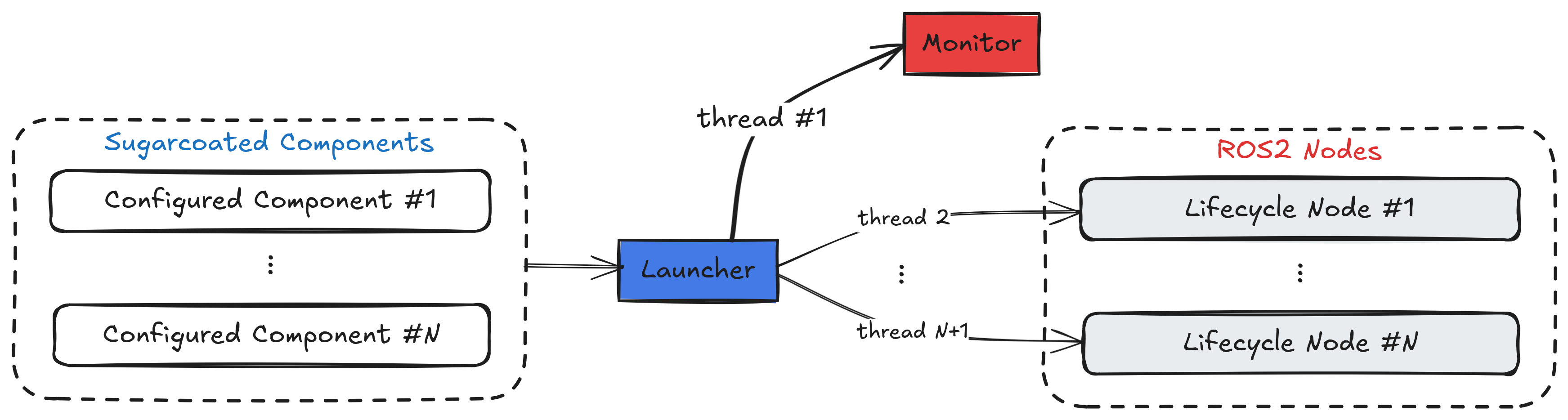
Multi-threaded execution#
multiprocessing=True. Each component gets a process of its own, and the launcher talks to it through ROS services. A crash in one component leaves the others running, and on_process_fail can bring it back. Startup takes longer, and the call needs the package name and entry point, which Kompass and EmbodiedAgents provide and a package of your own gets by following Extending EMOS. A component’s launch_prefix, for instance "taskset -c 4-7" or "nice -n 10", applies in this mode only.


Multi-process execution#
In both modes the Monitor stays in the launcher process. External nodes, included launch files and the drivers a plugin declares always run as processes of their own.
The robot and its sensors#
A plugin is attached with add_plugin. A recipe can have one robot plugin and any number of sensor plugins, and a Mount tells the launcher where a sensor sits so that its frame is published to TF without a URDF:
launcher.add_plugin(robot)
launcher.add_plugin(camera, mount=Mount(parent=robot, xyz=(0.15, 0.0, 0.35)))
Every component in the recipe is given every attached plugin, and topics declared with use_plugin are matched against them at bringup. A topic that names a plugin that was never attached fails the launch before anything starts, which is far cheaper than finding out on the robot. The plugin’s events and actions register like any other:
launcher.on(robot.events.low_battery(20.0), robot.actions.dock())
Attaching binds the plugin’s identity, so build its events and actions after add_plugin, not before. Launcher(robot_plugin=robot) is still accepted and does the same as add_plugin. Robot Plugins covers what a plugin provides.
Events, actions and routines#
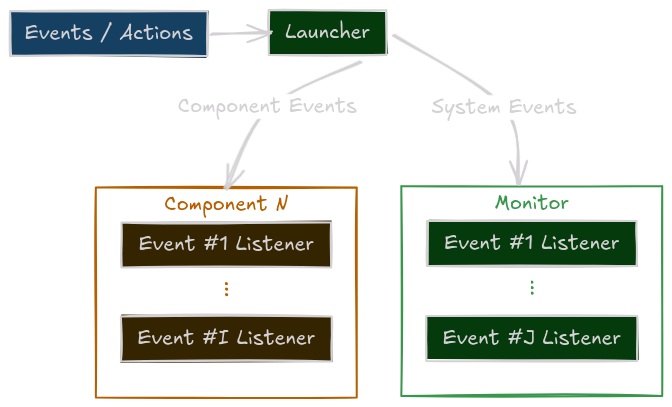
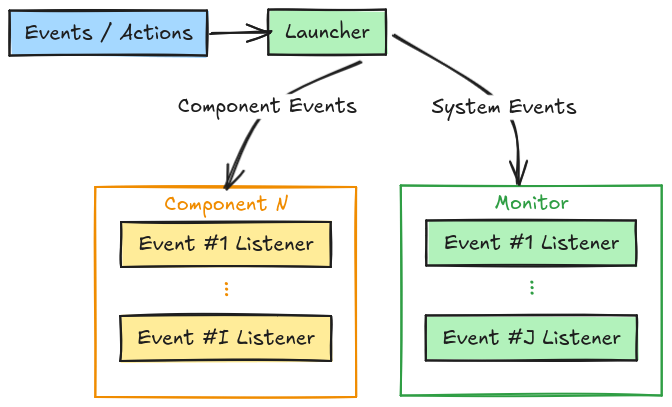
Events are registered either as the events_actions mapping of add_pkg, or one pair at a time with launcher.on(event, action). The action side can be a single Action, a launch action, a Routine, or a list of them. The Monitor watches the event and runs what you registered when it fires. Events and Actions explains the event conditions and the actions available, and Routines covers multi-step sequences.
Other processes#
Not everything in a recipe is a component. A MoveIt move_group, a camera driver or a vendor’s launch file can be brought up alongside the components:
launcher.add_ros_node(
    package="usb_cam",
    executable="usb_cam_node_exe",
    parameters=[{"video_device": "/dev/video0"}],
    respawn=True,
)
launcher.include_launch_file(
    package="my_robot_moveit_config",
    launch_file="move_group.launch.py",
    launch_args={"use_rviz": "false"},
)
add_ros_node takes the package and executable, and optionally a node name, parameters as dictionaries or YAML files, remappings, arguments and any other keyword the launch_ros Node action accepts. A missing package or executable is reported before the launch starts. The node inherits the launcher’s namespace and runs in its own process, and since the Monitor does not track it, pass respawn=True, and respawn_delay if you want a pause, to have it restarted when it dies.
include_launch_file takes Python, XML and YAML launch files. The file is looked up in the package’s share directory, directly or under launch/, and with package=None the name is used as a plain path. Launch arguments are passed as a dictionary.
A node started this way can only read ROS topics, and a plugin’s feed is not always one. publish_plugin_feedback puts a feed on a ROS topic so that such a node can subscribe to it:
launcher.add_plugin(robot)
launcher.publish_plugin_feedback(robot.feedbacks["Odometry"], "/odom")
launcher.add_ros_node(package="robot_localization", executable="ekf_node", parameters=["ekf.yaml"])
The feed is taken from the plugin’s feedbacks by its key, and the topic defaults to <plugin id>/<feed key>. Publishing a feed counts as using it, so a plugin that starts a driver only for the feeds a recipe asks for starts this one’s. A feed that is already a ROS topic is not published a second time: the launcher warns and names the topic it is on. The recipe does not start if the topic is already taken by another feed or by a component’s output.
Drivers that a plugin needs are declared inside the plugin and started through the same machinery, so a recipe does not add them itself.
The robot’s description#
The launcher hands one robot description to every component. launcher.robot sets the RobotConfig, launcher.frames the frame names, and launcher.robot_frame and launcher.world_frame the two frames most components need. A robot plugin supplies defaults for these, and a value set on the launcher wins over the plugin’s.
Two helpers update a named input or output on every component that has one. They are the quickest way to point an entire recipe at a feed:
launcher.inputs(location=Topic(name="odometry_filtered", msg_type="Odometry", use_plugin=True))
Configuration files#
Component settings can come from a YAML, JSON or TOML file instead of code. Pass it to the constructor, to bringup, or apply it with configure(config_file, component_name=None), which can also target a single component. Configuration describes the file layout.
The user interface#
launcher.enable_ui() starts the recipe’s own web interface: an HTTPS API for the recipe’s inputs, outputs, actions and routines, and by default a browser front end on top of it. See Web UI for what it serves and how it is secured.
When things fail#
Failures are handled at two levels. Each component evaluates its own health and runs the fallbacks you gave it, with on_fail for any failure and on_component_fail for the component’s own faults:
driver.on_component_fail(action=restart(component=driver), max_retries=3)
That covers a component that reports trouble. A process that dies outright, from a segmentation fault or the kernel’s memory killer, has nothing left in it to run a fallback, so the launcher handles that case itself:
launcher.on_process_fail(max_retries=3)
With this, a multi-process component whose process exits unexpectedly, that is with a non-zero code, outside shutdown and not by your signal, is started again, up to the given number of times. After that it is left down and an error is logged. Status and Fallbacks has the full picture, including the actions available as fallbacks.
Bringing it up#
launcher.bringup()
bringup checks the recipe before starting anything: at least one component was added, every use_plugin topic names an attached plugin, and the plugins’ robot configuration and base frame reach the components. Then it hands over to ROS launch and blocks until the recipe ends, either because you pressed Ctrl+C or because all components exited. On the way out it closes the plugin hosts and releases their shared memory.
If launch reports a failure, the recipe process exits with that non-zero code. emos run and the dashboard show such a run as failed, and a clean end prints ALL COMPONENTS EXITED SUCCESSFULLY. Two flags help when a recipe misbehaves at start: launch_debug=True turns on ROS launch’s own debug output, and introspect=True prints the launch description before it runs.
A complete example#
from ros_sugar import Launcher
from ros_sugar.core import BaseComponent, Event
from ros_sugar.actions import log, restart
from ros_sugar.io import Topic

# Components, usually imported from your package
driver = BaseComponent(component_name="lidar_driver")
planner = BaseComponent(component_name="path_planner")

# If the driver fails, restart it, at most three times
driver.on_component_fail(action=restart(component=driver), max_retries=3)

# An event on a plain ROS topic
battery = Topic(name="/battery", msg_type="Float32")
low_battery = Event(battery.msg.data < 15.0)

launcher = Launcher(config_file="config/robot_params.toml")
launcher.add_pkg(
    components=[driver, planner],
    package_name="my_robot_pkg",
    multiprocessing=True,
    ros_log_level="warn",
)
launcher.on(low_battery, log(msg="Battery low"))
launcher.on_process_fail(max_retries=3)

# Blocks until Ctrl+C
launcher.bringup()
The Monitor#
The Monitor is a plain ROS node, not a lifecycle node, that the launcher creates and configures for you. It does the run-time work of a recipe:
Events. It subscribes to every topic an event refers to and evaluates the conditions. Plugin feeds that never touch a ROS topic are fed to it directly by the plugin host, so an event on the robot’s own telemetry works exactly like one on a topic.
Actions and routines. It runs the actions you registered, hosts routines, and calls component methods over their services, which is what lets a routine drive components living in other processes.
Lifecycle. It holds the lifecycle and parameter clients of every component, activates them at start once they appear on the graph, and can start, stop, restart or reconfigure them on demand.
Runtime API. It serves a JSON API on the
/monitor/execute_methodservice that lists every addressable action and event, adds events and routines while the recipe runs, and controls routines. The dashboard and Cortex use it.Static transforms. It broadcasts the frames declared by mounts.
Component health is not the Monitor’s job. Each component evaluates its own status and runs its own fallbacks, and a dead process is the launcher’s on_process_fail.
See also
Components for what a component is and how it runs.
Events and Actions and Routines for the orchestration the Monitor carries out.
Robot Plugins for what attaching a plugin gives the recipe.
Running Recipes for running a recipe with
emos runand the dashboard.