
 EMOS
EMOS
Drive Manager
Safety enforcement and command smoothing.
The Drive Manager is the final gatekeeper before commands reach your robot’s low-level interfaces. Its primary job is to ensure that every command falls within the robot’s physical limits, satisfies smoothness constraints, and does not lead to a collision.
It acts as a safety shield, intercepting velocity commands from the Controller and applying Emergency Stops or Slowdowns based on immediate sensor data.
Safety Layers
The Drive Manager implements a multi-stage safety pipeline:
Emergency Stop — Critical Zone. Checks proximity sensors directly. If an obstacle enters the configured safety distance and angle, the robot stops immediately.
Dynamic Slowdown — Warning Zone. If an obstacle enters the slowdown zone, the robot’s velocity is proportionally reduced.
Control Limiting — Kinematic Constraints. Clamps incoming velocity and acceleration commands to the robot’s physical limits.
Control Smoothing — Jerk Control. Applies smoothing filters to incoming commands to prevent jerky movements and wheel slip.
Robot Unblocking — Moves the robot forward, backwards or rotates in place if the space is free to move the robot away from a blocking point. This action can be configured to be triggered with an external event.
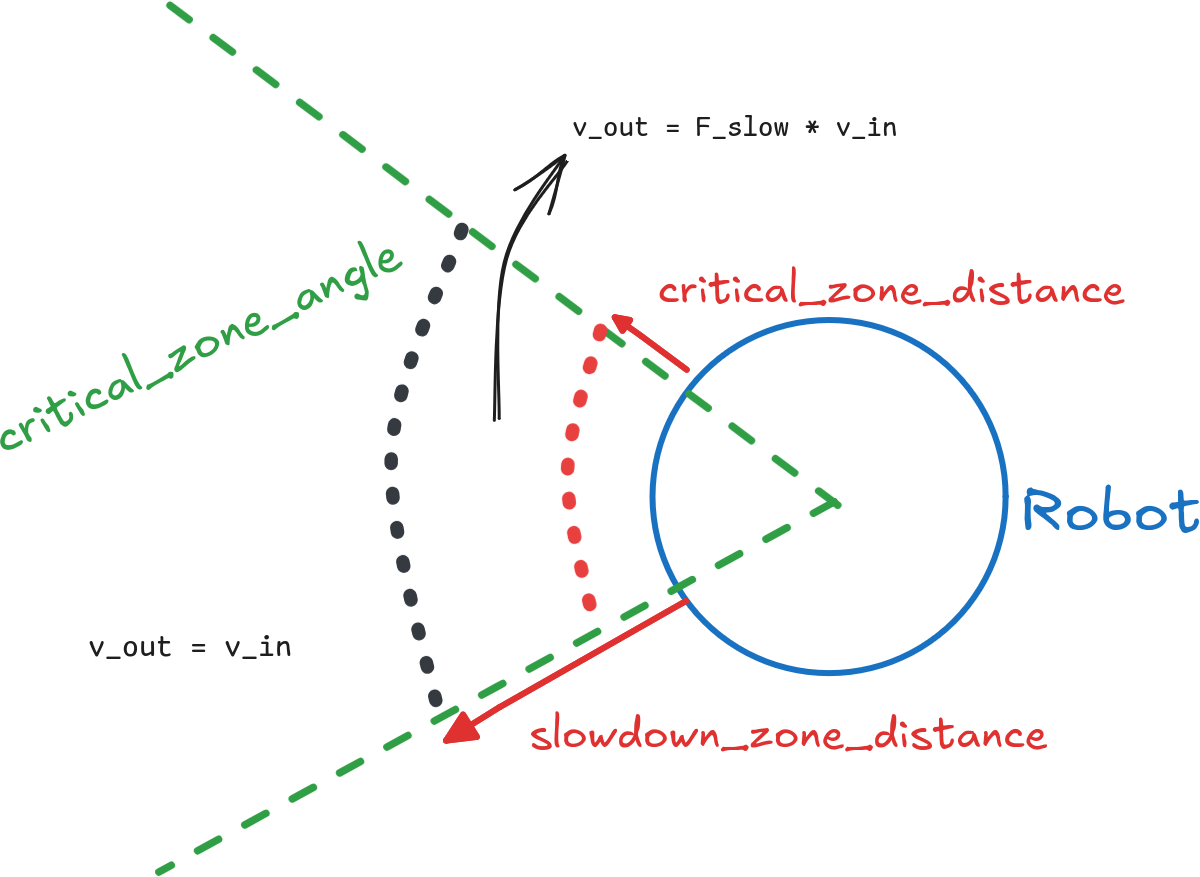
Emergency Zone & Slowdown Zone
Note
Critical and Slowdown Zone checking is implemented in C++ in kompass-core for fast emergency behaviors. The core implementation supports both GPU and CPU (defaults to GPU if available).
Built-in Actions
The Drive Manager provides built-in behaviors for direct control and recovery. These can be triggered via Events:
Action |
Function |
|---|---|
move_forward |
Moves the robot forward for |
move_backward |
Moves the robot backwards for |
rotate_in_place |
Rotates the robot in place for |
move_to_unblock |
Recovery behavior. Automatically attempts to move forward, backward, or rotate to free the robot from a collision state or blockage. |
Note
All movement actions require LaserScan information to determine if the movement direction is collision-free.
Available Run Types
Timed |
Sends incoming command periodically to the robot. |
Inputs
Key Name |
Allowed Types |
Number |
Default |
|---|---|---|---|
command |
1 |
|
|
multi_command |
1 |
|
|
sensor_data |
|
1 + (10 optional) |
|
location |
|
1 |
|
Outputs
Key Name |
Allowed Types |
Number |
Default |
|---|---|---|---|
robot_command |
|
1 |
|
emergency_stop |
|
1 |
|
Usage Example
from kompass.components import DriveManager, DriveManagerConfig
from kompass.ros import Topic

# Setup custom configuration
# closed_loop: send commands to the robot in closed loop (checks feedback from robot state)
# critical_zone_distance: for emergency stop (m)
my_config = DriveManagerConfig(
    closed_loop=True,
    critical_zone_distance=0.1,    # Stop if obstacle < 10cm
    slowdown_zone_distance=0.3,    # Slow down if obstacle < 30cm
    critical_zone_angle=90.0       # Check 90 degrees cone in front
)

# Instantiate
driver = DriveManager(component_name="driver", config=my_config)

# Remap Outputs
driver.outputs(robot_command=Topic(name='/my_robot_cmd', msg_type='Twist'))