
 EMOS
EMOS
Event-Driven VLA#
In VLA Manipulation we made an arm pick oranges with a VLA policy. The real value of a VLA shows once it is part of a larger cognitive system, and EMOS’s event-driven graphs are built for exactly that.
Most VLA policies are open-loop about task completion: they run for a fixed number of steps and then stop, whether the task succeeded or not. In this tutorial we close the loop around an open-loop policy. Even for a model that does signal its own completion, the design is a safety valve. Two components share the work:
The player, a VLA, tries to pick the oranges.
The referee, a VLM, watches the camera and judges whether the task is done.
An event on the referee’s verdict stops the player the moment the task is complete. The recipe runs against the same simulation as the previous tutorial.
The player#
The VLA is set up exactly as before, with the bridge’s topics, the GR00T policy and the dataset-cadence timing:
from agents.clients import LeRobotClient
from agents.components import VLA
from agents.config import VLAConfig
from agents.models import LeRobotPolicy
from agents.ros import Topic

joint_states = Topic(name="/so101/joint_states", msg_type="JointState")
front_camera = Topic(name="/so101/front/image_raw", msg_type="Image")
wrist_camera = Topic(name="/so101/wrist/image_raw", msg_type="Image")
joint_cmd = Topic(name="/so101/joint_cmd", msg_type="JointState")

policy = LeRobotPolicy(
    name="pick_orange_gr00t",
    policy_type="groot",
    checkpoint="aleph-ra/gr00t17_pick_orange_lora",
    dataset_info_file="https://huggingface.co/datasets/LightwheelAI/leisaac-pick-orange/resolve/main/meta/info.json",
    actions_per_chunk=16,
)
client = LeRobotClient(model=policy, host="127.0.0.1", port=8080)

# joint_names_map, camera_inputs_map, joint_limits and the timing as in the previous recipe
config = VLAConfig(...)

player = VLA(
    inputs=[joint_states, front_camera, wrist_camera],
    outputs=[joint_cmd],
    model_client=client,
    config=config,
    component_name="vla_sim",
)
The referee#
The referee is a vision-language model that looks at the front camera on a timer and answers one question: are all the oranges in the bowl? A FixedInput asks it the same question every time, worded strictly so that the answer is one word.
We run the model locally through Ollama. The GPU is shared with Isaac Sim and the policy server, and Ollama only places a vision model on the GPU when it fits the remaining memory in one piece, so next to those two on a 24 GB card a small model such as qwen2.5vl:3b is the candidate, and it may still end up on the CPU. A referee on the CPU competes with the simulation loop and can disturb the action timing the policy depends on, which is why the configuration below keeps its threads low and its period long. On a GPU with room, the period can be a few seconds.
from agents.clients import OllamaClient
from agents.components import VLM
from agents.config import VLMConfig
from agents.models import OllamaModel
from agents.ros import FixedInput

judge_model = OllamaModel(
    name="success_judge_vlm",
    checkpoint="qwen2.5vl:3b",
    options={"num_ctx": 4096, "num_thread": 2},
)
judge_client = OllamaClient(model=judge_model, inference_timeout=240)

judge_prompt = FixedInput(
    name="judge_prompt",
    msg_type="String",
    fixed=(
        "Look at the white and blue bowl on the kitchen counter. Are ALL three of the "
        "oranges inside that bowl, with none left on the counter? "
        "Answer with exactly one word: YES or NO."
    ),
)

success_check = Topic(name="/vla_sim/success_check", msg_type="String")

referee = VLM(
    inputs=[judge_prompt, front_camera],
    outputs=[success_check],
    model_client=judge_client,
    config=VLMConfig(max_new_tokens=5),
    trigger=120.0,
    component_name="success_judge",
)
Note
A number as the trigger makes the component timed rather than topic-driven, and the number is the period in seconds. The referee here looks every two minutes, which suits a CPU-placed model.
Tip
To make sure the model’s output is exactly the word you want, see how pre-processors are used in the Spatio-Temporal Memory recipe. Here we settle for testing whether YES is part of the answer.
The event#
Now the piece that closes the loop. An event fires when the verdict contains YES, and the player takes it as its termination trigger, with the timestep budget kept as a backstop:
from agents.ros import Event

success_event = Event(success_check.msg.data.contains("YES"), on_change=True)

player.set_termination_trigger(mode="event", stop_event=success_event, max_timesteps=1800)
on_change=True is right for the referee, which keeps publishing verdicts, NO after NO and then YES, and should trigger once when the answer turns. The simulation’s own success marker, /so101/task_success, is a different kind of topic: it publishes YES once, when the scene’s condition is met, so there is nothing to turn. An event on it fires on that one message either way, because a condition that is already true when the event first evaluates it counts as a rising edge, and the simpler form leaves on_change out:
task_success = Topic(name="/so101/task_success", msg_type="String")
success_event = Event(task_success.msg.data.contains("YES"))
That variant needs no referee at all, but it also only exists in a simulator with an oracle. The VLM referee works anywhere there is a camera.
See also
Events reach much further than this. A speech-to-text component’s output and an event that turns it into a goal would start the VLA by voice. The Adaptivity & Resilience recipes show more of what they can do.
A decision model makes a faster referee, one that answers every second with a probability and reads the task from the VLA itself. Decision Models builds that version of this recipe.
Launching the system#
When the graph comes up, the VLA starts moving the arm, the referee watches, and the first YES ends the goal with success. Without it, the goal ends at the timestep cap. The web interface shows the goal control, the front camera and the referee’s verdicts:
from agents.ros import Launcher

launcher = Launcher()
launcher.enable_ui(inputs=[player.ui_main_action_input], outputs=[success_check, front_camera])
launcher.add_pkg(components=[player, referee])
launcher.bringup()
Open https://localhost:5001, accept the certificate once, and enter the same task as before, Grab orange and place into plate. The goal can also be sent from a terminal exactly as in the previous recipe.
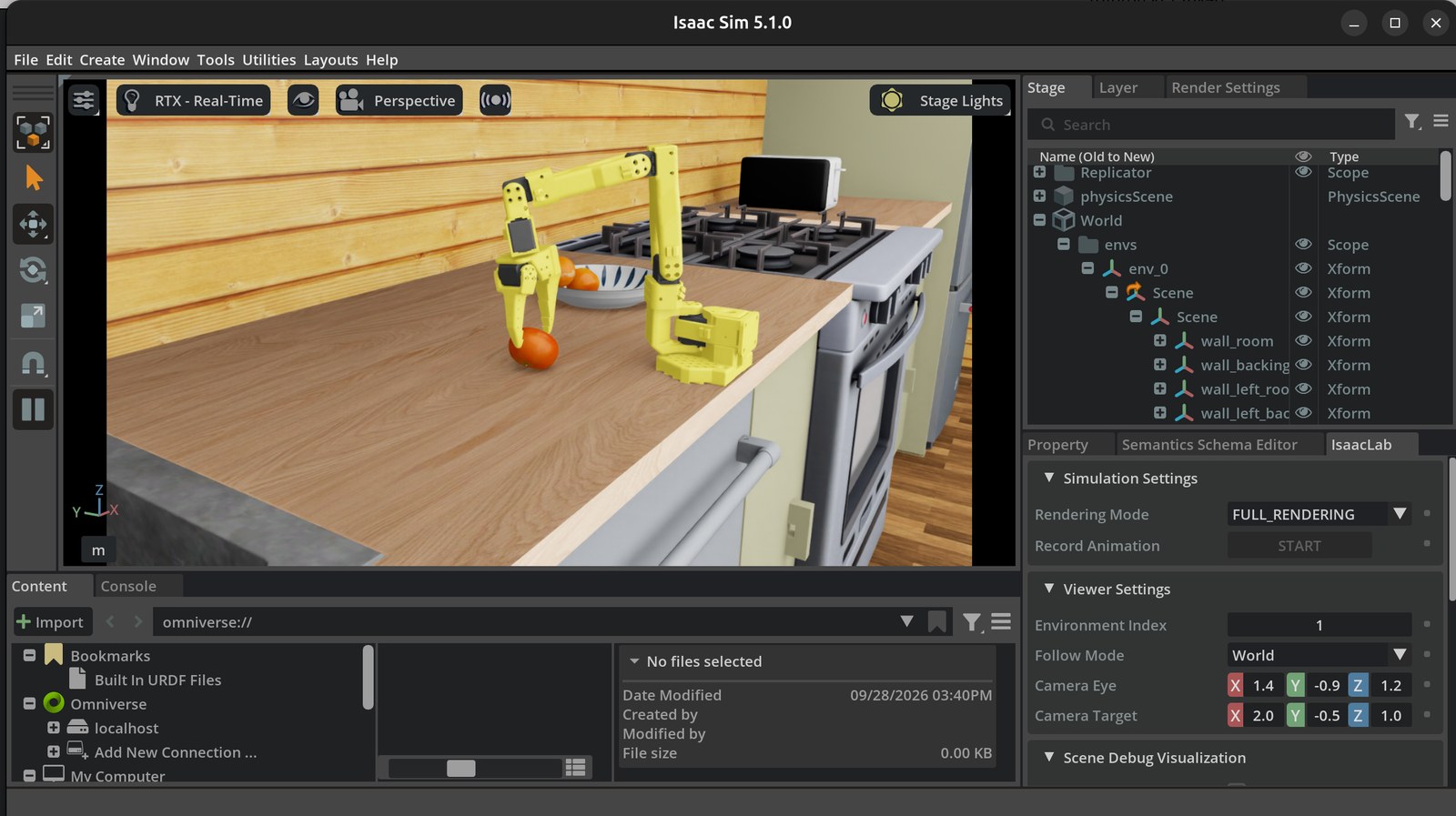
Mid-episode in Isaac Sim: one orange is in the bowl and the gripper closes on the next, while the referee watches the front camera.#
Complete code#
 1from agents.clients import LeRobotClient, OllamaClient
 2from agents.components import VLA, VLM
 3from agents.config import VLAConfig, VLMConfig
 4from agents.models import LeRobotPolicy, OllamaModel
 5from agents.ros import Event, FixedInput, Launcher, Topic
 6
 7# --- Topics from the simulation bridge ---
 8joint_states = Topic(name="/so101/joint_states", msg_type="JointState")
 9front_camera = Topic(name="/so101/front/image_raw", msg_type="Image")
10wrist_camera = Topic(name="/so101/wrist/image_raw", msg_type="Image")
11joint_cmd = Topic(name="/so101/joint_cmd", msg_type="JointState")
12
13# --- The player ---
14policy = LeRobotPolicy(
15    name="pick_orange_gr00t",
16    policy_type="groot",
17    checkpoint="aleph-ra/gr00t17_pick_orange_lora",
18    dataset_info_file="https://huggingface.co/datasets/LightwheelAI/leisaac-pick-orange/resolve/main/meta/info.json",
19    actions_per_chunk=16,
20)
21client = LeRobotClient(model=policy, host="127.0.0.1", port=8080)
22
23SO101_JOINTS = ["shoulder_pan", "shoulder_lift", "elbow_flex", "wrist_flex", "wrist_roll", "gripper"]
24limits = {joint: {"lower": -100.0, "upper": 100.0} for joint in SO101_JOINTS[:-1]}
25limits["gripper"] = {"lower": 0.0, "upper": 100.0}
26
27config = VLAConfig(
28    joint_names_map={f"{joint}.pos": joint for joint in SO101_JOINTS},
29    camera_inputs_map={"front": front_camera, "wrist": wrist_camera},
30    joint_limits=limits,
31    observation_sending_rate=0.55,
32    action_sending_rate=10.0,
33    aggregate_fn_name="latest_only",
34)
35
36player = VLA(
37    inputs=[joint_states, front_camera, wrist_camera],
38    outputs=[joint_cmd],
39    model_client=client,
40    config=config,
41    component_name="vla_sim",
42)
43
44# --- The referee ---
45judge_model = OllamaModel(
46    name="success_judge_vlm",
47    checkpoint="qwen2.5vl:3b",
48    options={"num_ctx": 4096, "num_thread": 2},
49)
50judge_client = OllamaClient(model=judge_model, inference_timeout=240)
51
52judge_prompt = FixedInput(
53    name="judge_prompt",
54    msg_type="String",
55    fixed=(
56        "Look at the white and blue bowl on the kitchen counter. Are ALL three of the "
57        "oranges inside that bowl, with none left on the counter? "
58        "Answer with exactly one word: YES or NO."
59    ),
60)
61success_check = Topic(name="/vla_sim/success_check", msg_type="String")
62
63referee = VLM(
64    inputs=[judge_prompt, front_camera],
65    outputs=[success_check],
66    model_client=judge_client,
67    config=VLMConfig(max_new_tokens=5),
68    trigger=120.0,
69    component_name="success_judge",
70)
71
72# --- The event that closes the loop ---
73success_event = Event(success_check.msg.data.contains("YES"), on_change=True)
74player.set_termination_trigger(mode="event", stop_event=success_event, max_timesteps=1800)
75
76# --- Launch ---
77launcher = Launcher()
78launcher.enable_ui(inputs=[player.ui_main_action_input], outputs=[success_check, front_camera])
79launcher.add_pkg(components=[player, referee])
80launcher.bringup()
Tip
Promote this recipe to production. While you are shaping it, run the script directly with python recipe.py. Once it is solid, drop it at ~/emos/recipes/<name>/recipe.py and start it with emos run <name>, or from the dashboard. Either way every run is logged under ~/emos/logs, and an operator gets a card to launch it from a browser. Running Recipes covers the two ways of running a recipe and what differs per install mode.